Product tour
Watch LoadSnap work.
Filmed in the real product.
Pick the side of the trade you are on and watch one load go through it, start to finish. Narrated, captioned, four minutes at most. The phone apps are underneath.
This is what receiving waste looks like in LoadSnap.
Filmed in the product, not drawn in a slide deck. A real load through a real gate.
A load in at the gate, checked and filed
The three ways a receipt starts, a load the weighbridge sent up being checked at a desk, the filing that follows it, and the gate fee behind it.
In this film
Jump to a partSpoken throughout. Captions are on the CC button, in the same words.
Read the film insteadevery line it says, 18 lines
- 0:00This is a receiving site, from the lorry on the weighbridge to the DEFRA filing.
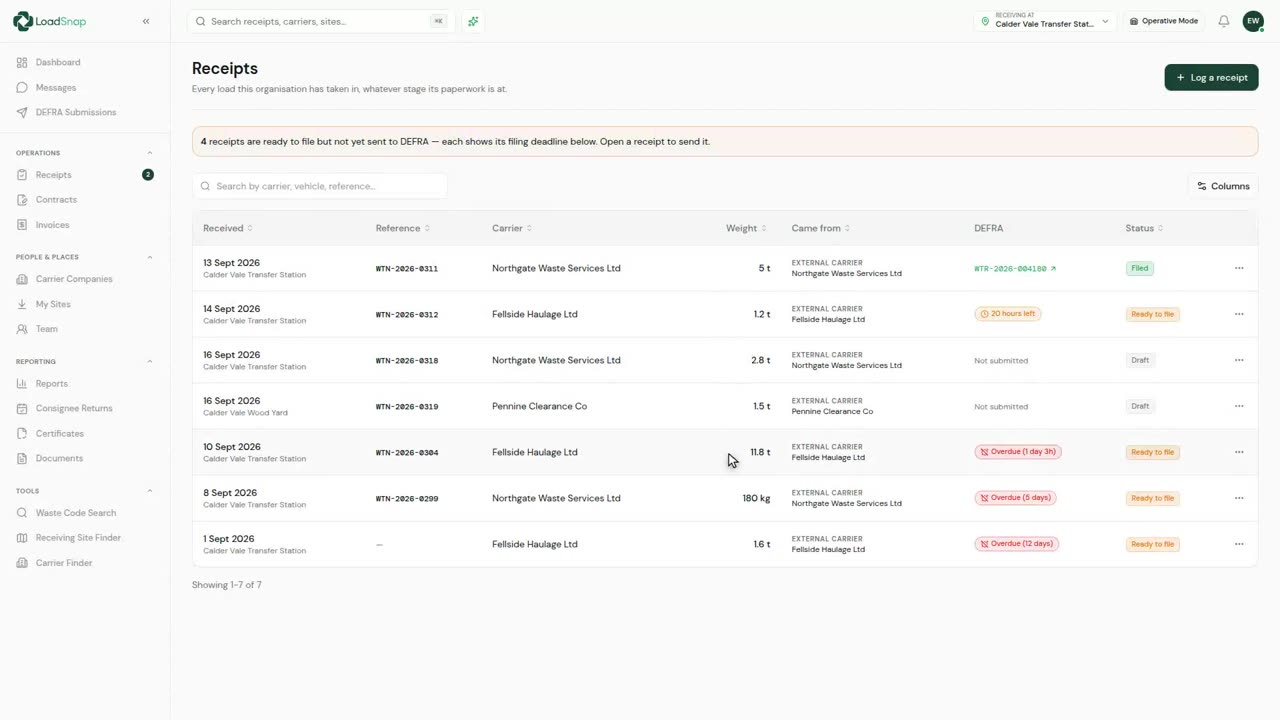
- 0:05Every load the site has taken in, whatever stage its paperwork is at.
- 0:09The filing deadline is two working days from the load arriving, and it is counted for you.
- 0:14A receipt starts one of three ways.
- 0:16You type it in, you scan the paper transfer note the carrier handed you, or you pull the whole load through with a Connect code.
- 0:23The scan reads the note with OCR and fills in what it can. The code pulls the carrier, the transport and every waste item straight off the carrier's own record.
- 0:33A load weighed in at the gate arrives here as a draft for somebody at a desk to check.
- 0:38The gate captures the load, and the desk is where it is checked.
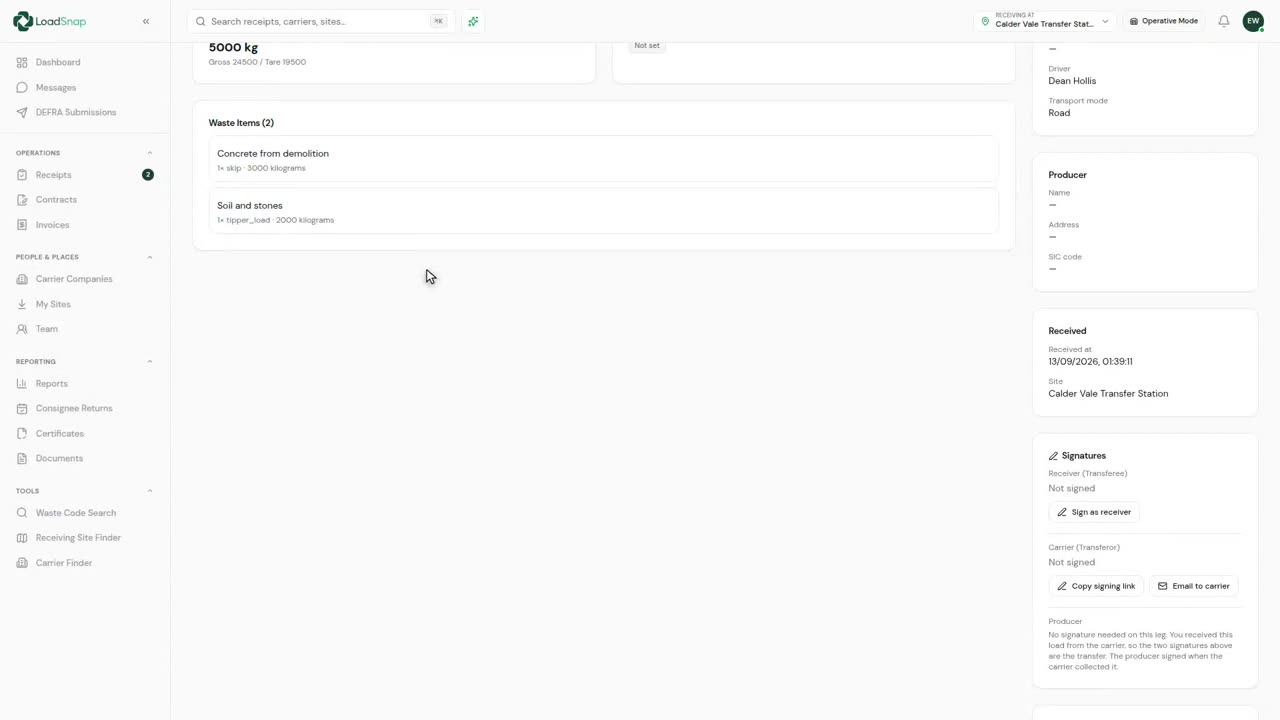
- 0:42The weight off the weighbridge, the haulier that brought it, and the code it came in under.
- 0:47Nothing is filed until a person has checked it, and the desk is told what is still missing before DEFRA would say so.
- 0:54Checked over, it goes to DEFRA on one press, and until then the record says plainly they have not had it.
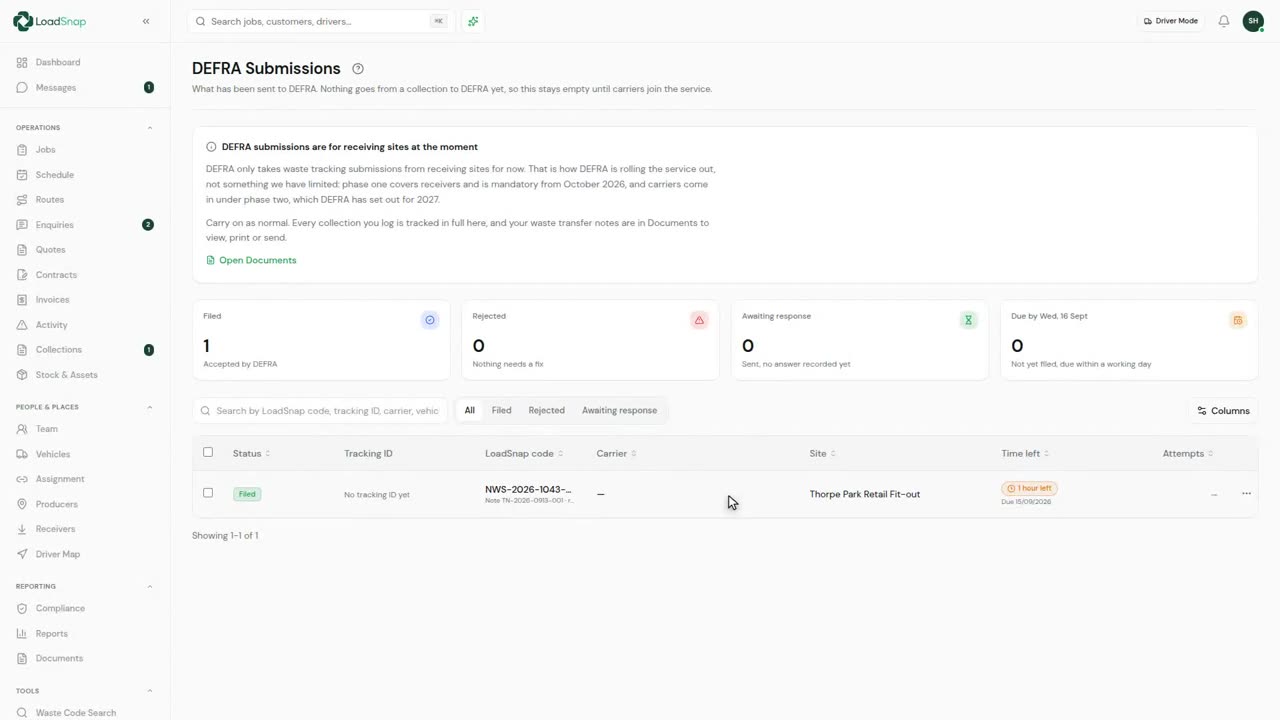
- 1:00Only a receipt is filed with DEFRA, and this is what has gone, with the tracking number it gives back.
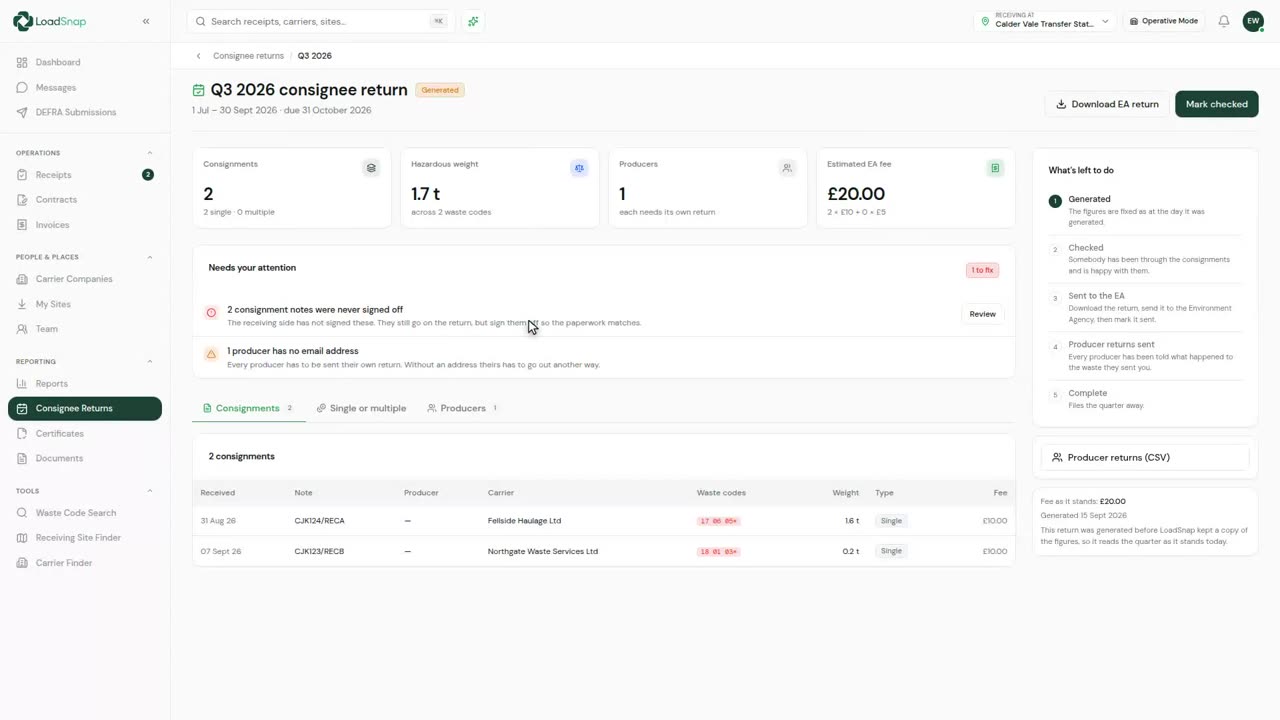
- 1:06The quarterly consignee return builds itself out of the same records.
- 1:10Every haulier that tips here is on file, with its registration and somebody to ring.
- 1:15Each one is checked against the Environment Agency register, so a lapsed licence shows at the gate rather than at an audit.
- 1:22Gate fees go out on the loads you took, off the same records.
- 1:26Every note and certificate is filed against the record it came from.
- 1:30Weighed once, checked once, filed once.
Read the film insteadevery line it says, 33 lines
- 0:00This is a carrier, from the first enquiry to the load leaving your hands.
- 0:04Enquiries arrive from your website, through a webhook, or over the phone.
- 0:09A website enquiry converts into a job, without anybody retyping what the customer has already told you.
- 0:15A producer you have not worked with before is created here.
- 0:18The job opens with the producer, the site and the reference already on it.
- 0:23Taken over the phone, you start the same form from Jobs.
- 0:26The job type is the visit itself: collection only, drop-off and collection, wait while load, or a swap.
- 0:33Where it is going is the site you tip at, with the permit it is tipped under.
- 0:38The waste carries its own code, and all eight hundred and fifty are searchable by code or by description, with the hazardous ones flagged as you pick them.
- 0:46Hazardous entries, POPs and the disposal code sit on the item itself.
- 0:51Costing goes on the job too, if you are billing out of LoadSnap.
- 0:55Scheduling is optional here. You can create the job and plan it another day.
- 0:59Everybody who works for you is on one page, with what each of them can get into.
- 1:05What a vehicle can carry is held on the vehicle, and it gates the jobs it can take.
- 1:10Drivers are then assigned to vehicles, so the yard is crewed before any work goes on the board.
- 1:15Anyone not on a lorry counts as free, so a gap in the crewing is visible before the day starts.
- 1:21Your skips and ro-ros are registered as numbered assets, by size.
- 1:25Jobs draw on them, so you can see what is out on hire and what is at the yard.
- 1:30The board runs on vehicles, not drivers.
- 1:32In waste it is the capability of the vehicle that decides what a job can go on.
- 1:37Jobs go on the board by dragging them onto a vehicle, and changing a time pushes it to whoever is on that lorry.
- 1:44The same day again as a route, one colour per lorry, so you can see the round before it runs.
- 1:49Once the day is out you can see where the lorries actually are, without ringing anybody.
- 1:54Messaging is built in, one driver or a group, so it replaces WhatsApp.
- 1:58The driver collects, and it comes back here already classified.
- 2:02The transfer note is written: producer, carrier, site, waste and weight.
- 2:06A carrier has nowhere to tip, so the last thing on a load is who took it.
- 2:11Where it went can be a site you hold, or simply a name, because most tips are not in anybody's data.
- 2:17Saving it records your duty of care: the waste is somebody else's now, and the note says so.
- 2:23The same load bills the customer, so the invoice and the transfer note cannot disagree.
- 2:28Each invoice is built from the loads on it, so nothing is priced twice or typed in again.
- 2:33Every note and certificate is filed against the record it came from.
- 2:37One record, from the enquiry to the load leaving your hands.
Read the film insteadevery line it says, 39 lines
- 0:00LoadSnap is for carriers, receivers and brokers.
- 0:03This firm both carries and receives, so the load is followed from the enquiry to the filing.
- 0:08Enquiries arrive from your website, through a webhook, or over the phone.
- 0:13A website enquiry converts into a job, without anybody retyping what the customer has already told you.
- 0:19A producer you have not worked with before is created here.
- 0:22The job opens with the producer, the site and the reference already on it.
- 0:27Taken over the phone, you start the same form from Jobs.
- 0:30The producer is whoever the waste actually belongs to, and the conversion has set it.
- 0:35The job type is the visit itself: collection only, drop-off and collection, wait while load, or a swap.
- 0:42Where the load is going is already set, with the permit it is tipped under.
- 0:46The waste carries its own code, and all eight hundred and fifty are searchable by code or by description, with the hazardous ones flagged as you pick them.
- 0:55Hazardous entries, POPs and the disposal code sit on the item itself.
- 0:59Costing goes on the job too, if you are billing out of LoadSnap.
- 1:03Scheduling is optional here. You can create the job and plan it another day.
- 1:08Everybody who works for you is on one page, with what each of them can get into.
- 1:14What a vehicle can carry is held on the vehicle, and it gates the jobs it can take.
- 1:19Drivers are then assigned to vehicles, so the yard is crewed before any work goes on the board.
- 1:24Anyone not on a lorry counts as free, so a gap in the crewing is visible before the day starts.
- 1:30The board runs on vehicles, not drivers.
- 1:32In waste it is the capability of the vehicle that decides what a job can go on.
- 1:37Your skips and ro-ros are registered as numbered assets, by size.
- 1:41Jobs draw on them, so you can see what is out and what is at the yard.
- 1:45A collection only, a drop-off and collection, and a swap each use them differently.
- 1:50Jobs go on the board by dragging them onto a vehicle.
- 1:53Change a time and whoever is on that vehicle gets a push notification.
- 1:57The same day again as a route, one colour per lorry, so you can see the round before it runs.
- 2:03Messaging is built in, one driver or a group, so it replaces WhatsApp.
- 2:07The driver collects, and it comes back here already classified.
- 2:10The transfer note is written: producer, carrier, site, waste and weight.
- 2:15When the wagon tips, the collection is settled from the record itself.
- 2:19If only part of the load stayed here, you say so now rather than correcting it later.
- 2:24Tick what carried on. It stays on the note and out of the yard figures.
- 2:28Converting it writes the receipt and closes the collection against it.
- 2:32The receipt holds the whole load, and only what stopped here counts as taken in.
- 2:36The receipt is what DEFRA takes, with the tracking number it gives back.
- 2:41Every note and certificate is filed against the record it came from.
- 2:45And the same load bills the customer, so the invoice, the transfer note and the DEFRA record cannot disagree with each other.
- 2:51Each invoice is built from the loads on it, so nothing is priced twice or typed in again.
- 2:57One record, from the enquiry to the filing.
The phone apps
And on a phone at the weighbridge
The phone is optional. If your weighbridge is run from the office, the same load is taken in on the screen above and nobody needs a phone at all.
What your weighbridge operative sees
Whoever is on the bridge or out in the yard can take the load in on a phone, by hand or by scanning the driver's code, and it is away before the lorry pulls off. We call that person a weighbridge operative.
1:11
One screen at a time
Short films of the parts you just watched, free to play, each with its own page.
DEFRA rollout
What the films show is Phase 1. Here is what changes in Phase 2.
DEFRA mandates the receiving side first and the carrying side a year later. LoadSnap is built for both, and the receiving workflow simply gets shorter when carriers come on board.
Receivers file, as in the receiving film
The carrier still arrives with a paper transfer note, so the receiving site is the one that records the movement digitally and files it to DEFRA.
- Operative selects the carrier from the saved library and adds the vehicle and driver
- Each item captured - photo + AI-suggested EWC where the load's visible, manual entry for sealed loads; the operative confirms
- Container, form and weight captured at the bridge
- Back office reviews and files the movement - a Waste Tracking ID comes back
Carriers join - and the receiver flow gets shorter
Once carriers are mandated, the movement is created and given a Waste Tracking ID when the job is planned. The driver carries that ID to the gate, so the receiver stops re-keying and starts confirming.
- The operative enters the carrier's code; the waste details pre-fill from the carrier's submission
- They still photograph and weigh the load - that part doesn't change
- Back office checks what the carrier filed to DEFRA against what actually arrived
- If the figures don't match, they correct the record before it's finalised
Digital waste tracking is live
The mandate is here.
Automate compliance.
Receiving sites in England and Wales have had to record every load digitally since 1 October 2026. Start a 14-day free trial in minutes, cancel any time before it ends, and file every load from day one.
DEFRA API integrated · EA carrier verification · UK data residency