Features
Everything LoadSnap does. In one place.
From the first enquiry to the DEFRA filing, for carriers, yards, skip and plant hire, and brokers. All 71 features. Pick a tile to see how it works.
Capture
Getting the load off the yard and into a record, in the time it takes to shut the tailgate.
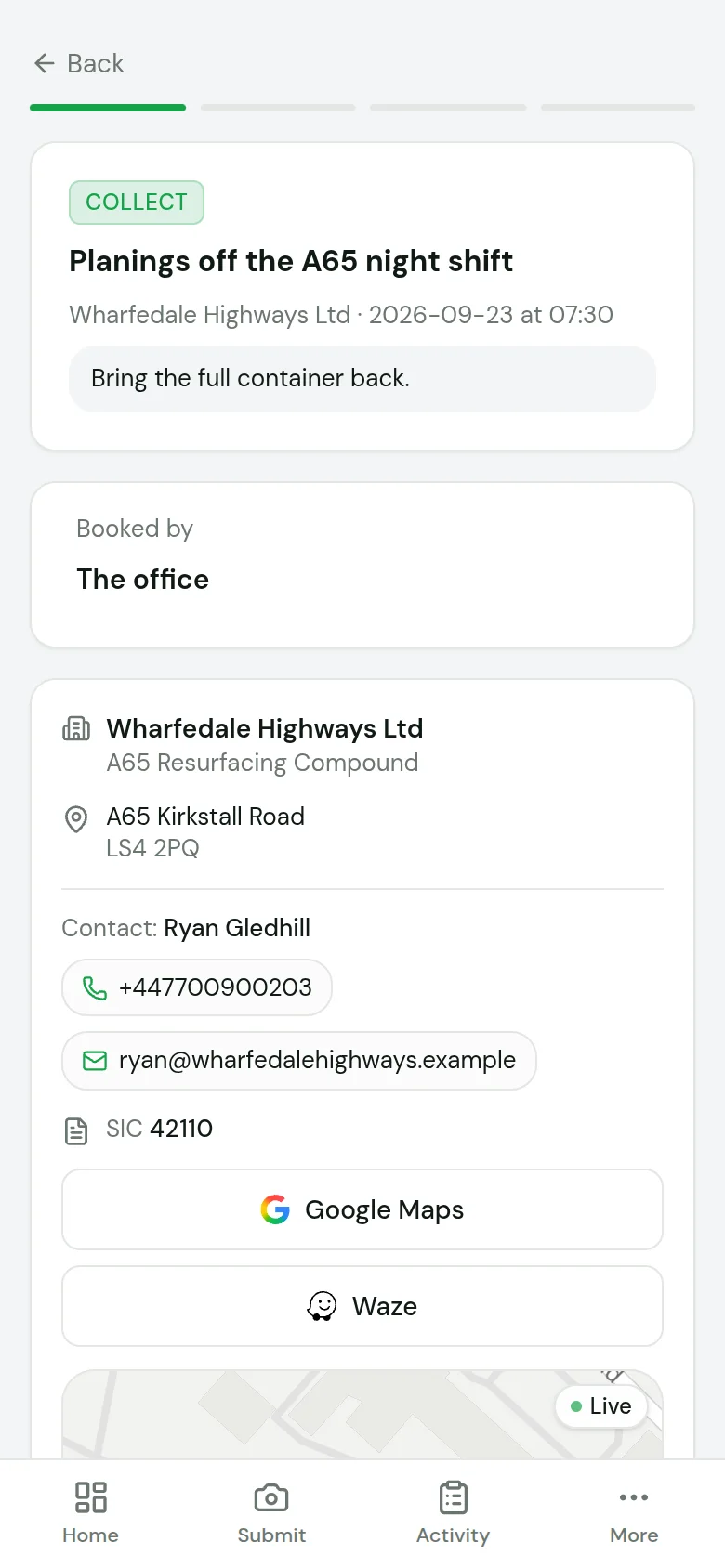
Driver app
Photo to submitted in under 90 seconds.
iPhone and iPad app on the App Store
On the App Store. Any other phone runs it from the browser.
Works with no signal
Loads wait on the phone and send when signal returns.
AI waste classification
Photograph the load, get the EWC code. 850+ codes.
Weighbridge capture
Gross and tare keyed, net worked out, ticket photographed.
Operative terminal at the gate
Scan, weigh, submit in under a minute.
Weighbridge Connector
Reads your bridge's indicator and puts the weight on the receipt.
Location on the record
Where it was collected and signed for, stamped as it happened.
Digital signatures
Producer, driver and yard sign on the phone.
Paper in, digital out
Photograph a paper note and the fields are read off it.
Your own fields on the record
Skip size, site reference, anything you ask for, on the note if you want it.
Ad-hoc and email submissions
A one-off load from the app, a link or an email.
Online booking
Your own booking page, with your prices on it.
Planning the day
The part most compliance tools leave to a whiteboard.
Route planning and optimisation
Stops in order, with a tip added when the body fills.
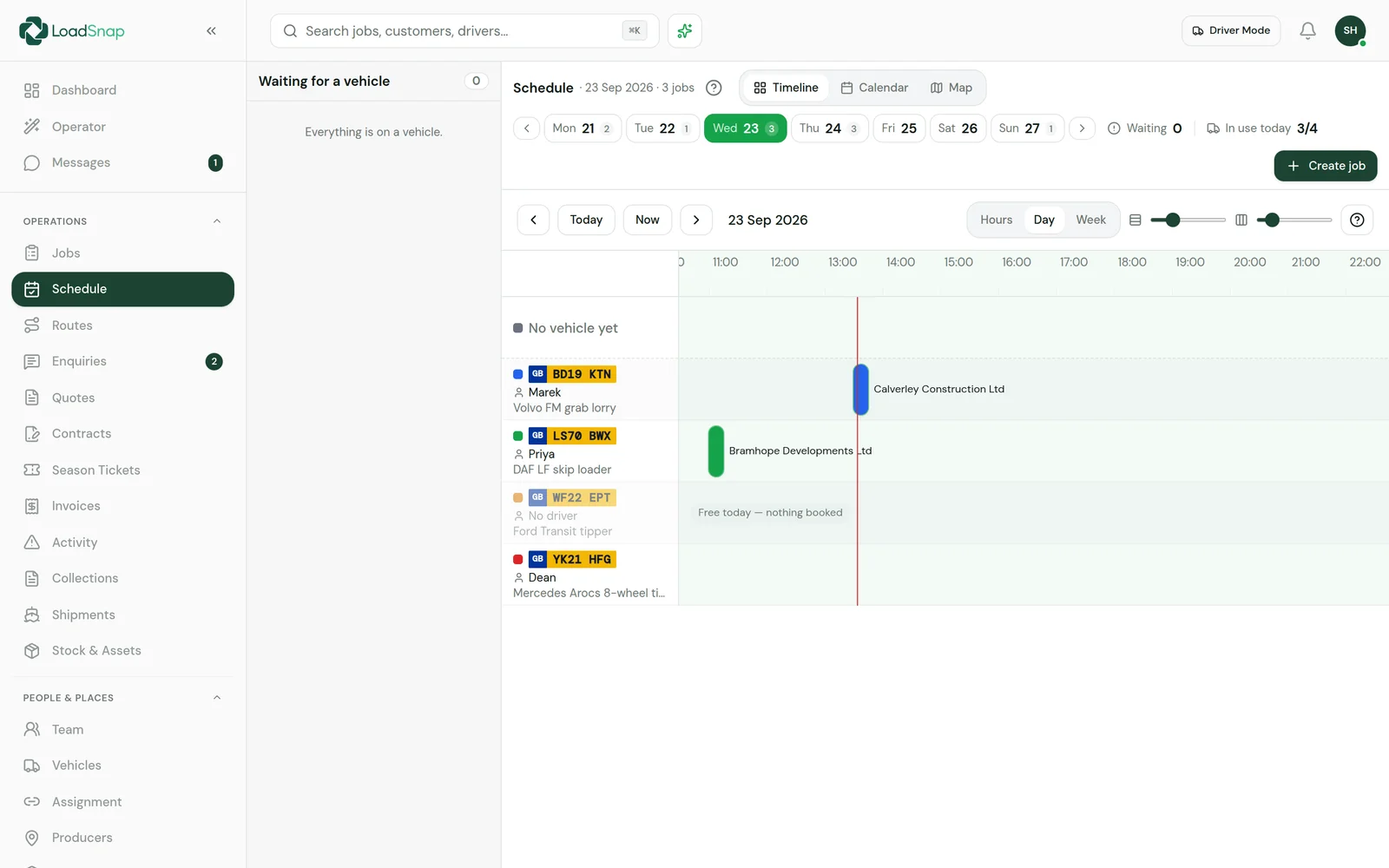
Drag-and-drop scheduler
Drag a job to move it. The driver is told.
Recurring work
Contracts raise their own jobs, so a weekly round is set up once.
Routes that plan themselves
The driver opens the day already in order.
Overdue jobs come back
A missed job returns to the unscheduled list.
Crewing the vehicles
Drag a driver onto a vehicle to crew it.
Run board on the office wall
Today's runs on a screen the whole office can see.
Leave and absence
Who is off, and which vehicles that leaves short.
Compliance
The documents and the filing, produced from the work rather than typed afterwards.
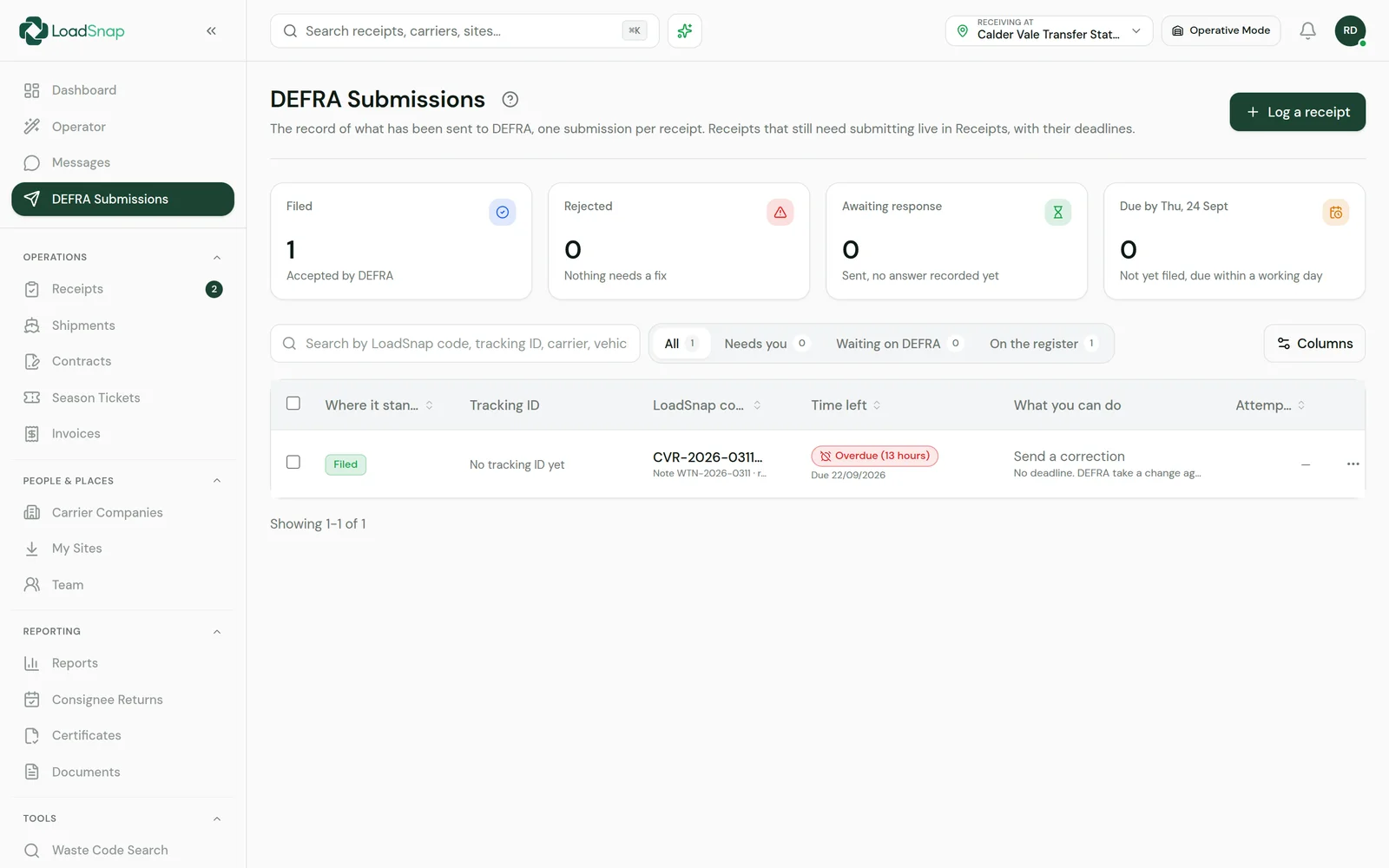
DEFRA digital waste tracking
Filed straight from the record, on every plan.
Waste Transfer Notes
A real PDF, signed on the phone. Welsh too.
Hazardous consignment notes
HP codes, POPs and the three labelled copies.
Season tickets
One note for up to twelve months of the same load.
Annex VII shipments
Waste exports, paperwork done.
One filing per load
Carrier and yard share one record, filed once.
Carrier and permit checks
Checked against the Environment Agency register.
Consignee returns
Quarterly returns built from the records you hold.
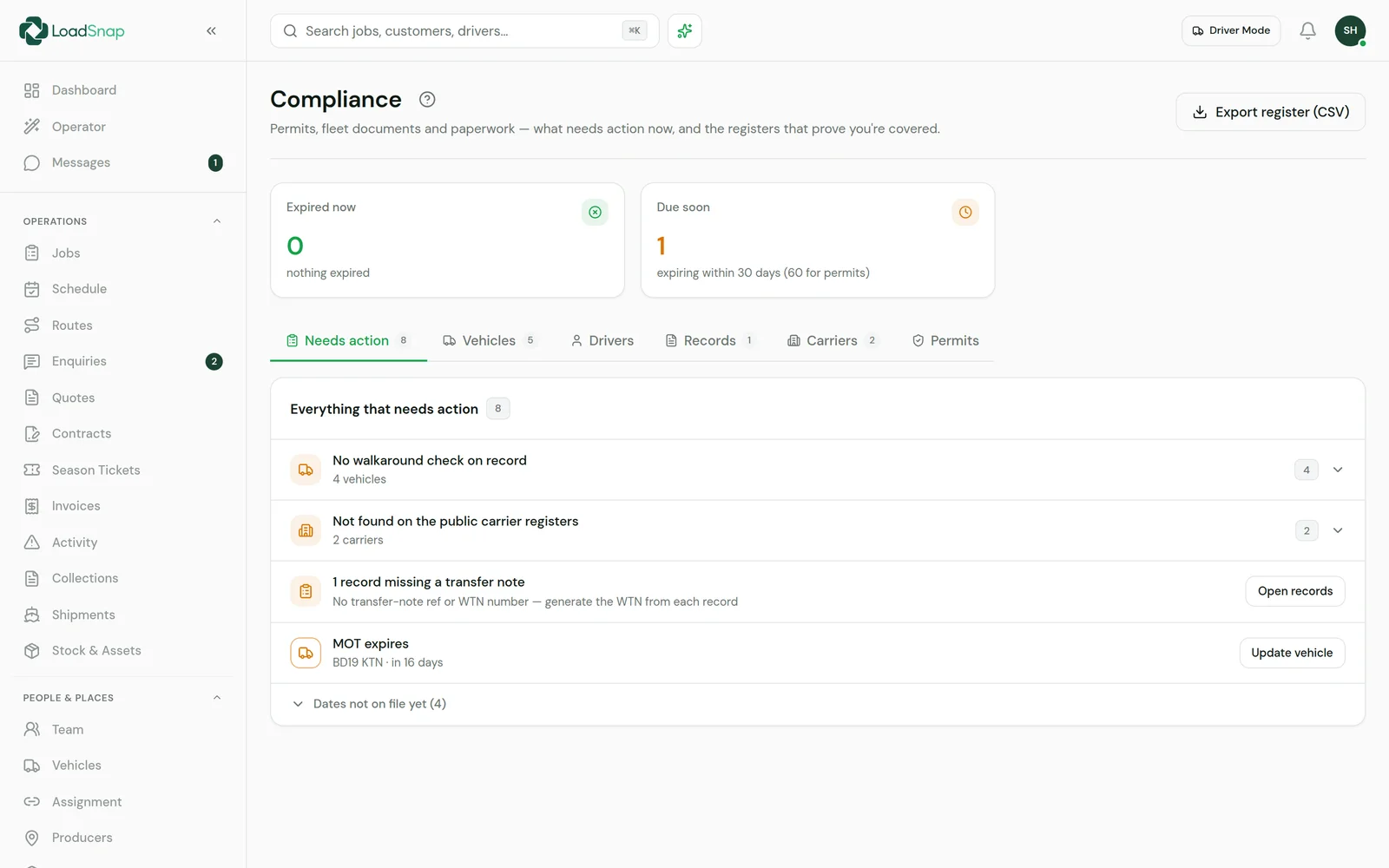
Licence and expiry dashboard
Licences, permits, training and insurance, warned before they lapse.
EWC, disposal and recovery code lookup
Every waste code, searchable, hazardous ones marked.
Certificates of destruction
Issued from the load, so the weights always match.
Two-year duty-of-care archive
Every document searchable, kept for two years.
Receiving site and carrier finder
Find a site permitted to take the load.
Fleet and assets
The vehicles, the drivers and the boxes they move.
Vehicle safety checks
Walkaround checks with defects photographed.
MOT and tax
Pulled from DVLA, warned before expiry.
Skips, RoRos and bins
Know which containers are out and which are free.
Plant and skip hire
Diggers and dumpers on hire, at the cheapest rate for the customer.
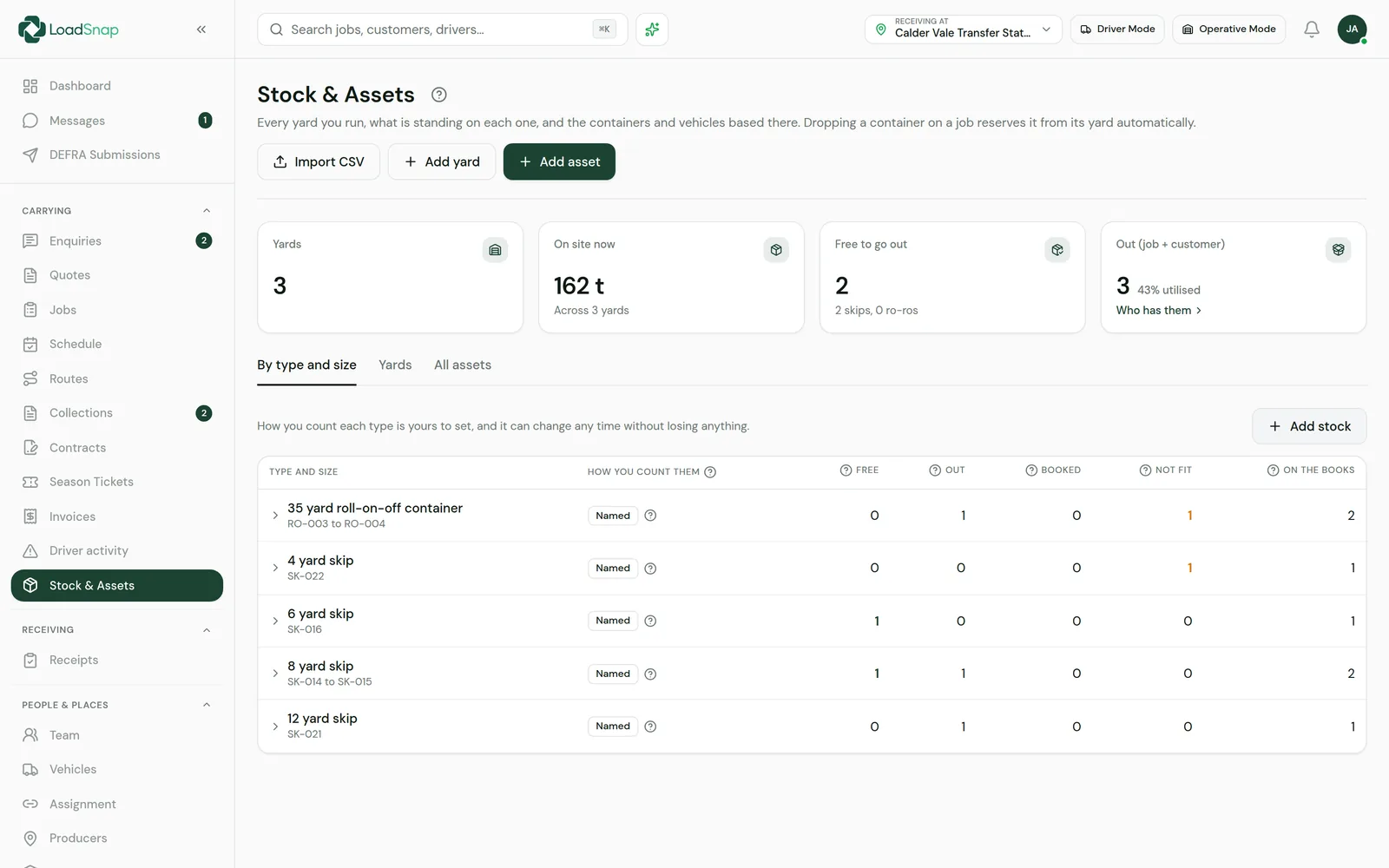
Stock and yards
What is on each yard, by waste code and tonnage.
Permit headroom
Tonnes against your yearly allowance and holding limit.
Drivers and qualifications
Licence categories and expiries, warned before they run out.
Fuel and expenses from the cab
Photograph the pump receipt and AI reads it.
Breakdowns, accidents and odometer readings
Reported from the phone with photos and location.
Fuel finder
The cheapest diesel near a depot or run.
Commercial
Getting paid for the work you have already logged.
Invoicing
Invoices raised from the work you already logged.
VAT and nominal codes
Your own codes, zero-rated lines respected.
Payments and part payments
Card through Stripe, BACS or cash recorded.
Sage, Xero and QuickBooks
Export in each package's own format.
Enquiries
Every enquiry in one list, turned into a quote.
Quotes
Customers accept or decline themselves.
Rate cards
Agreed prices per customer, container and waste code.
Surcharges, discounts and standing charges
Priced onto the job, shown as their own lines.
Contracts
Signed agreements that raise their own jobs.
Everyone else who needs to see it
Producers, customers and the office.
Producer portal
Free for your customers: their notes, jobs and sites.
Customer portal
Invoices, quotes, documents and job history, per site.
Partner portal
For anyone who introduces customers to LoadSnap.
Back office
Jobs, schedule, fleet, invoicing and DEFRA on one screen.
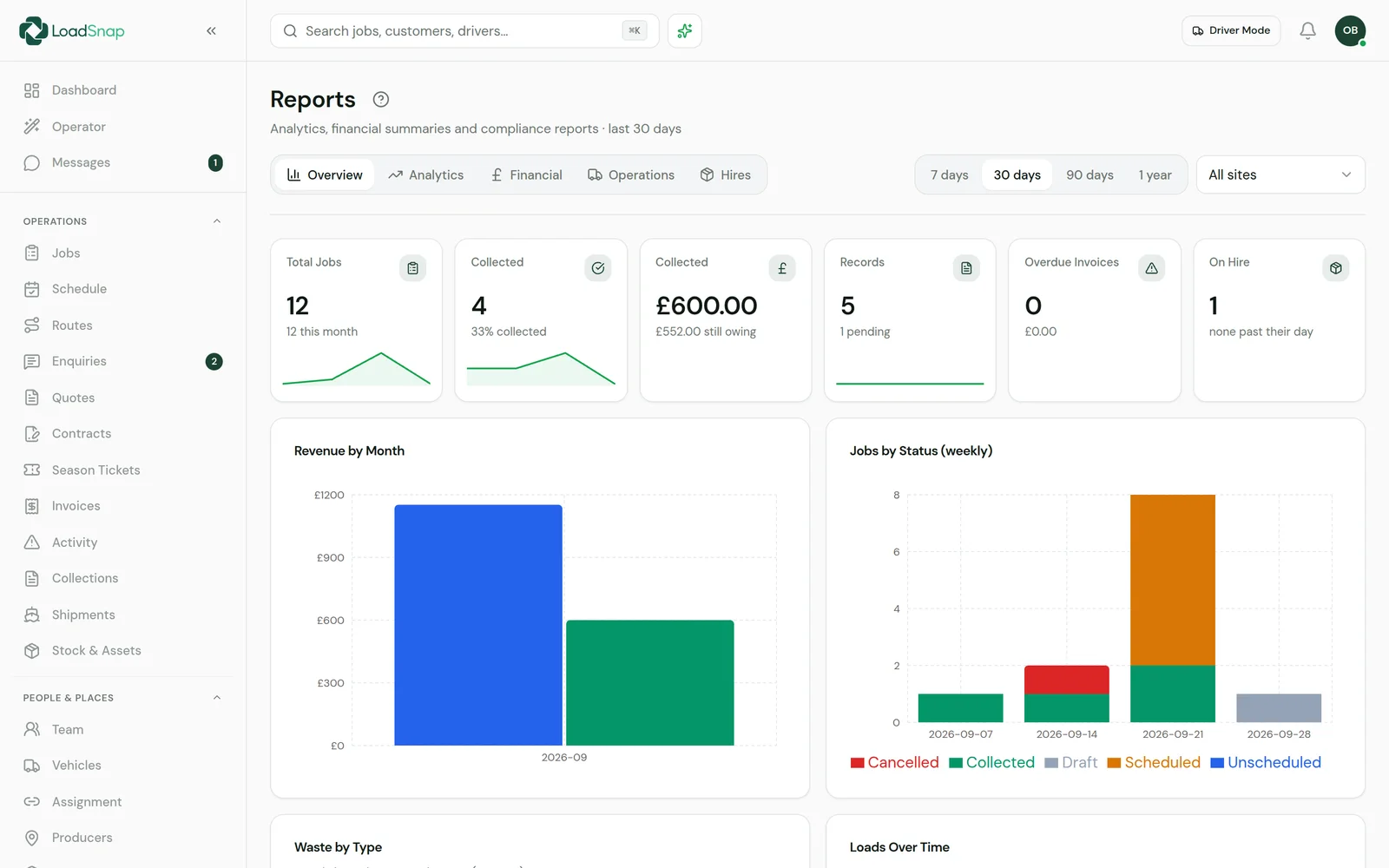
Reporting and analytics
Tonnage, waste mix, DEFRA health and period on period.
Recycling and diversion rates
What actually happened to the waste, load by load.
Carbon reporting
Emissions and landfill savings per load.
Copilot
Ask your records a question in plain English.
Team chat
Office, drivers and yard, with the job attached.
Team and roles
Add people and choose what each one can see.
Multi-site
Many sites, with people scoped to the ones they work at.
White label
Your logo and colour on documents, portals and payment pages.
Data in and out
Where LoadSnap meets everything else.
DVLA
Vehicle, MOT and tax from the registration.
Companies House
Customers and carriers checked against the register.
Environment Agency registers
Registered carriers and permitted sites, searchable.
Inbound webhooks
Post jobs in from your own system.
MCP Connector
Ask Claude, ChatGPT and other AI assistants about your loads.
REST API
Read your records from your own systems.
Every feature in full.
What each one does, and where it stops.
Capture
Getting the load off the yard and into a record, in the time it takes to shut the tailgate.
Driver app
Installs to the phone's home screen from a link, with its own icon and no app store account. The iPhone and iPad app is on the App Store too. Photo to submitted in under 90 seconds.
iPhone and iPad app on the App Store
The official LoadSnap app for iPhone and iPad, installed from the App Store and signed into with the same email and password. Job notifications arrive through Apple. Every other phone, Android included, runs the same app from the browser.
There is no Android app in Google Play yet.
Works with no signal
The app is kept on the phone, so it opens out of coverage and shows the last jobs the office sent. A collection captured with no signal queues on the device and sends itself when signal returns, with an idempotency key so a retry can never duplicate the load.
The phone has to have opened the app once, with signal, before it can open without. The iPhone and iPad app from the App Store needs signal to open; once open, it queues loads the same way. Navigation is handed to Google or Waze, which want a connection to plan a route.
AI waste classification
Photograph the load and the EWC code, the hazardous flag and a plain-English description come back. 850+ codes.
Weighbridge capture
The operative keys gross and tare and LoadSnap nets it, with the ticket and the bridge display photographed against the record.
Works with whatever bridge is already installed. Key the figures by hand, or add the Weighbridge Connector to read them off the indicator.
Operative terminal at the gate
A tablet locked to one job at the weighbridge or the gatehouse. Scan the QR, log the waste, key the weight, submit, in under a minute, with nothing lost in the queue.
Weighbridge Connector
A small program on the weighbridge computer reads your existing indicator and sends the weight straight onto the receipt. Works with any indicator that sends text, and falls back to typing if it stops.
It only reads the indicator. It never writes to it, so the approved display stays the legal one.
Location on the record
Where the load was collected and where it was signed for, stamped on the record at the moment it happened.
Digital signatures
Producer, driver and receiving site sign on the phone, on the record.
Paper in, digital out
Photograph an existing paper transfer note or weighbridge docket and the fields are read off it and filed.
Your own fields on the record
Add the fields your operation actually asks for, such as skip size, material type, physical form or a site reference, as text, numbers, dates, tick boxes or dropdowns, and choose which of them print on the transfer note.
Ad-hoc and email submissions
A one-off load with no job behind it, logged from the app, a link, or an email to a unique inbox.
Online booking
Your own booking page with your containers and your prices on it, to link from your website. A booking lands in your enquiries, already priced.
Planning the day
The part most compliance tools leave to a whiteboard.
Route planning and optimisation
Real road distances and drive times, stops ordered to cut the round, and a tip inserted when the body fills. Learned service times from your own history rather than a flat guess per stop.
Drag-and-drop scheduler
A time axis with a lane per vehicle. Drag a job along it to move the time, drag it down to change the vehicle, and the driver is told.
Recurring work
Contracts generate their own jobs on schedule, so a weekly round is set up once.
Routes that plan themselves
The driver opens the day already in order, with the yard and the tip in it, and one tap navigates to the next stop.
Overdue jobs come back
A scheduled job that did not happen returns to the unscheduled list and is surfaced, rather than sitting on a day that has passed.
Crewing the vehicles
A board of vehicles beside a board of drivers. Drag a driver onto a vehicle to crew it, with the crew each job needs derived from the work rather than remembered.
Run board on the office wall
A screen for the office wall showing today's runs, the yard and the day, updating as drivers work through it.
Leave and absence
Holidays and absence booked against each person, with the vehicles left short on a day shown before the day arrives.
Compliance
The documents and the filing, produced from the work rather than typed afterwards.
DEFRA digital waste tracking
Submission to the DEFRA API, included on every plan including the free one. Never an add-on. DEFRA takes submissions from receiving sites in phase one, so a receipt is what gets filed today; carriers come in under phase two and LoadSnap already records everything that phase needs.
Waste Transfer Notes
Duty-of-care WTNs as a real PDF, including Welsh-language notes.
Hazardous consignment notes
Full HWCN workflow with HP codes, POPs, consignment numbering and the three labelled copies.
Season tickets
One note covering repeated identical transfers for up to twelve months, with the eligibility rules enforced rather than assumed.
Annex VII shipments
The Annex VII form for waste shipped abroad, filled from the load and printed as a PDF.
One filing per load
Where the carrier and the receiver are both on LoadSnap, the two halves pair and file once. Two submissions for one movement is double-counted national tonnage, and it cannot happen here.
Carrier and permit checks
Registrations checked against the Environment Agency register, with expiry warnings before the licence lapses.
Consignee returns
Quarterly returns built from the records already held.
Licence and expiry dashboard
Carrier registrations, site permits, driver licences, training records and insurance in one view, with the DEFRA filing status of every load beside them. It warns before anything lapses and shows what has not been filed.
EWC, disposal and recovery code lookup
The full European Waste Catalogue, the D and R codes and the container types, searchable, with the hazardous entries marked.
Certificates of destruction
Issued from the receipt or collection the material arrived on, so the items and weights cannot drift from the transfer note. A certificate covers the items you choose and their weight rather than the whole load, so one load can carry several, and it can hang off a collection for shredding done at the customer's premises. Immutable once issued: a mistake is voided with a reason and replaced. Every certificate carries a code the customer can check on a public page.
A commercial assurance, not a WEEE evidence note. Only an Approved Authorised Treatment Facility can issue those, so electricals still get their evidence from the treatment site.
Two-year duty-of-care archive
Every document searchable, kept for the retention period.
Receiving site and carrier finder
Search for a site permitted to take the waste, or a registered carrier, from the Environment Agency registers.
Fleet and assets
The vehicles, the drivers and the boxes they move.
Vehicle safety checks
DVSA-style walkaround checks in the app, defects raised on the spot with photos, recorded against the vehicle and the driver.
MOT and tax
Pulled from DVLA against the registration, with expiry warnings.
Skips, RoRos and bins
Containers tracked as assets with their own state, history and availability, so a booking knows what is free.
Plant and skip hire
Mini diggers, skid steer loaders and tracked dumpers hired out self-drive or with an operator, priced from your own day, weekend and week rates, whichever is cheaper for the customer. A machine already booked on a day cannot be booked again, delivery and collection go on the schedule, and hire charged sits against the costs of each machine and each kind of skip.
Stock and yards
Every yard you run on one screen, with what is standing on each by EWC code and by tonnage, and the containers and vehicles based there.
Permit headroom
An append-only stock ledger behind every yard, tracking the two limits separately: tonnes accepted against the annual allowance across the permit year, and tonnes standing on site against the holding limit. Clearing the yard restores holding headroom, it does not buy back allowance.
Drivers and qualifications
Licence categories and expiry dates, with alerts before they run out.
Fuel and expenses from the cab
The driver photographs the pump receipt and AI reads the amount, the date, the station, the litres, the price per litre and the fuel type off it. Filed against that driver and that vehicle, with the image kept.
Breakdowns, accidents and odometer readings
Reported from the driver's phone with photos and a location, on the vehicle's record, so the day it happened is not a phone call somebody half remembers.
Fuel finder
Diesel prices near a depot or a run, so the cheapest stop can be sent to the driver rather than guessed at.
Commercial
Getting paid for the work you have already logged.
Invoicing
Invoices raised from the jobs and receipts already recorded, with credit notes, purchase-order numbers carried from the quote, and overdue chasing.
VAT and nominal codes
Your own nominal and tax codes, and VAT that respects zero-rated lines and operators who are not VAT registered rather than assuming 20% on everything.
Payments and part payments
Card payments through Stripe, and BACS or cash recorded against the invoice, so an invoice paid in two instalments reads as partly paid rather than still owing in full.
Sage, Xero and QuickBooks
Export in each package's own format, with your nominal and tax codes.
An export, not a live two-way sync. LoadSnap does the day-to-day waste billing and hands the ledger over.
Enquiries
Incoming work from producers landed in one list, linked to the producer or the site it came from, and turned into a quote rather than left in somebody's mailbox.
Quotes
Quotes the customer can accept or decline themselves, and which become jobs.
Rate cards
Agreed rates per customer, per container and per EWC code, snapshotted onto the contract so a later price change never rewrites an old job.
Surcharges, discounts and standing charges
Per-EWC surcharges, named additional charges, minimum charges, day rates and free days on a container, priced onto the job automatically and shown as their own lines on the invoice.
Contracts
Signed agreements that raise their own work.
Everyone else who needs to see it
Producers, customers and the office.
Producer portal
Free to the producer, provided by the carrier or receiver they use. Their notes, their jobs, their sites.
Customer portal
Invoices, quotes, documents and job history, per site.
Partner portal
A portal of their own for anyone who introduces customers to LoadSnap.
Back office
Jobs, the schedule, approvals, fleet, compliance, invoicing and DEFRA submissions, run from one screen rather than six.
Reporting and analytics
Tonnage, EWC mix, DEFRA submission health, discrepancy rates and period-on-period comparison.
Recycling and diversion rates
What actually happened to the waste, read off the disposal or recovery code recorded against each load: recycled, composted, burnt for energy, spread to land, or landfilled. Recycling and diversion are reported separately, because burning for energy is one and not the other.
The rates are out of the tonnage that carries a route. A load with no disposal or recovery code, or only an interim step such as storage, is counted and shown on its own rather than assumed to be either.
Carbon reporting
Emissions from treatment and the saving against landfilling the same waste, priced per load from the published UK government greenhouse gas conversion factors, using the EWC code for the material and the disposal or recovery code for the route.
An estimate for Scope 3 reporting, not a measurement. A material and route the published table does not price is left unpriced rather than given a plausible figure.
Copilot
Ask your own records a question in plain English and get the movements, jobs and receipts back. Names resolved for you, scoped to your organisation from your login.
Read-only. It finds records, it does not change them.
Team chat
Office, drivers and operatives, with the job attached to the thread. Groups, mentions, polls and announcements.
Team and roles
Add the office, drivers and operatives, and choose what each person can see and do.
Multi-site
Many sites under one organisation, with people scoped to the ones they work at.
White label
Your logo and colour on documents, portals and payment pages.
Data in and out
Where LoadSnap meets everything else.
DVLA
Vehicle, MOT and tax lookups from the registration.
Companies House
Customer and carrier verification against the register.
Environment Agency registers
Registered carriers and permitted sites, searchable.
Inbound webhooks
Post a job in from your own system on a signed endpoint, with your fields mapped to ours.
MCP Connector
Let an AI assistant read your movements, receipts, DEFRA filings and parties directly, and count loads and tonnage over any period.
Read-only today.
REST API
A versioned API at /v1 over your collections, receipts and their waste items, jobs, enquiries, quotes, invoices, DEFRA submissions, producers, receivers, carriers, brokers, team, vehicles and filed documents. Lists sort newest first and filter on what changed since a given time, for polling tools. Bearer auth with a key you mint yourself, 600 requests a minute, paginated.
Business and above, and read-only today.
What LoadSnap does not do.
We would rather you bought the right thing. If one of these is the job you need doing, LoadSnap is the wrong tool for it and we will say so on a call as readily as here.
Live GPS fleet tracking
LoadSnap stamps where a collection happened and shows where a driver last checked in. It is not a continuous vehicle feed, and if a live map of the fleet is what you are buying, buy telematics.
Subcontractor management
Third-party carriers can be recorded and their registrations verified, but there is no subcontractor allocation, rate agreement or self-billing.
A general ledger
The sales side is here: invoices and credit notes raised from the work, purchase-order numbers carried through, part payments, VAT and nominal codes, overdue chasing, and revenue, invoiced and outstanding reported. What is not here is the rest of a bookkeeping package: the nominal ledger itself, purchase ledger, bank reconciliation, VAT returns and year end. Those stay with Sage, Xero or QuickBooks, and LoadSnap exports to all three.
A write API
The REST API at /v1 reads collections, receipts, jobs, enquiries, quotes, invoices, DEFRA submissions, producers, receivers, carriers, brokers, team, vehicles and documents, from Business up, with a key you mint yourself. Keys do not write; apps connected with Sign in with LoadSnap can add producers, receivers, carriers and enquiries, from Pro up. Creating a movement, submitting to DEFRA and outbound event webhooks are still being built, and there are no SDKs.
Digital waste tracking is live
The mandate is here.
Automate compliance.
Receiving sites in England and Wales have had to record every load digitally since 1 October 2026. Start a 14-day free trial in minutes, cancel any time before it ends, and file every load from day one.
DEFRA API integrated · EA carrier verification · UK data residency